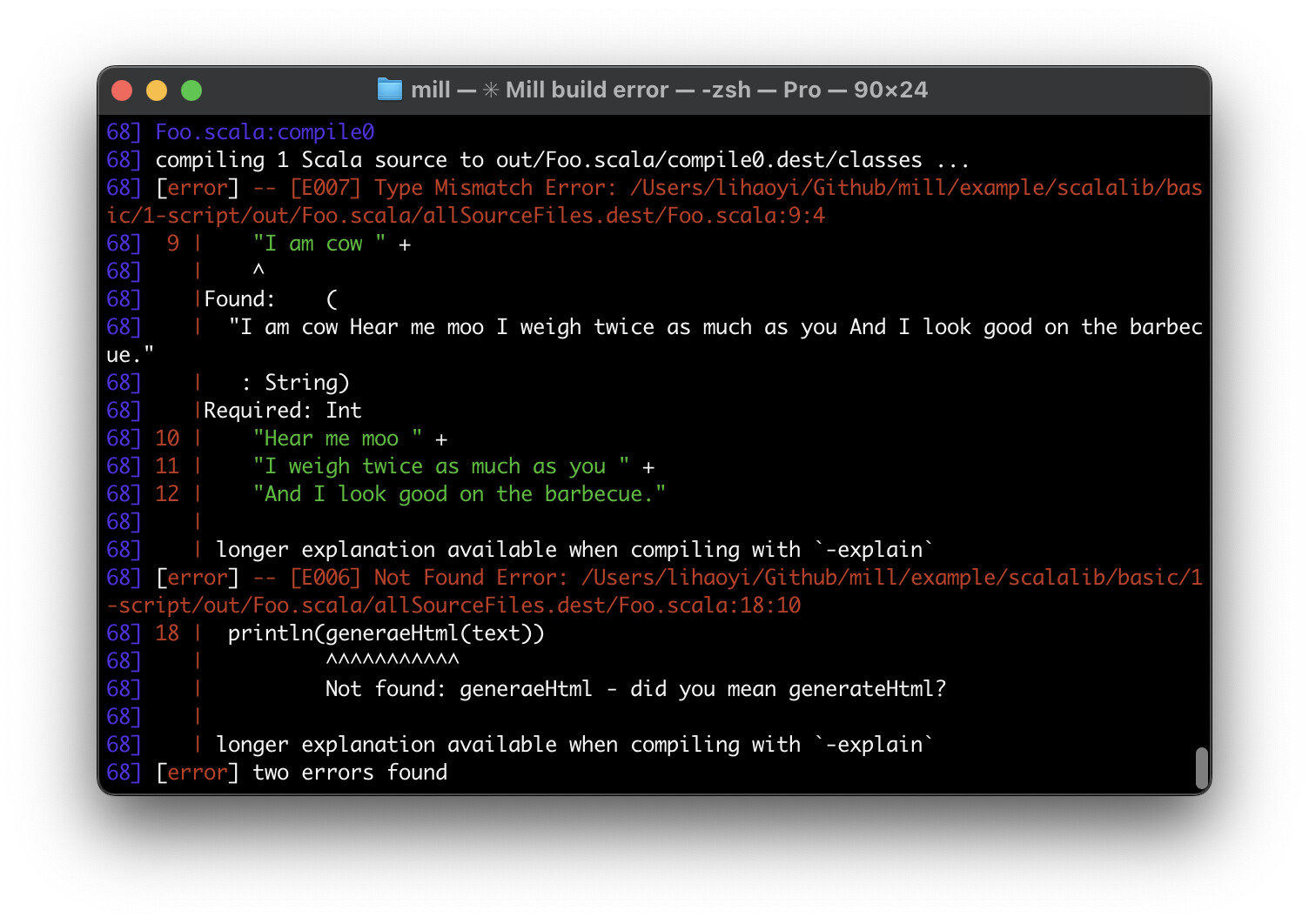
Maybe not the prettiest messages in the world, but otherwise serviceable. Apart from some tweaks like using relative paths instead of absolute paths, it looks basically the same as Scala 2
In contrast, here is Scala3’s formatting for the same errors:
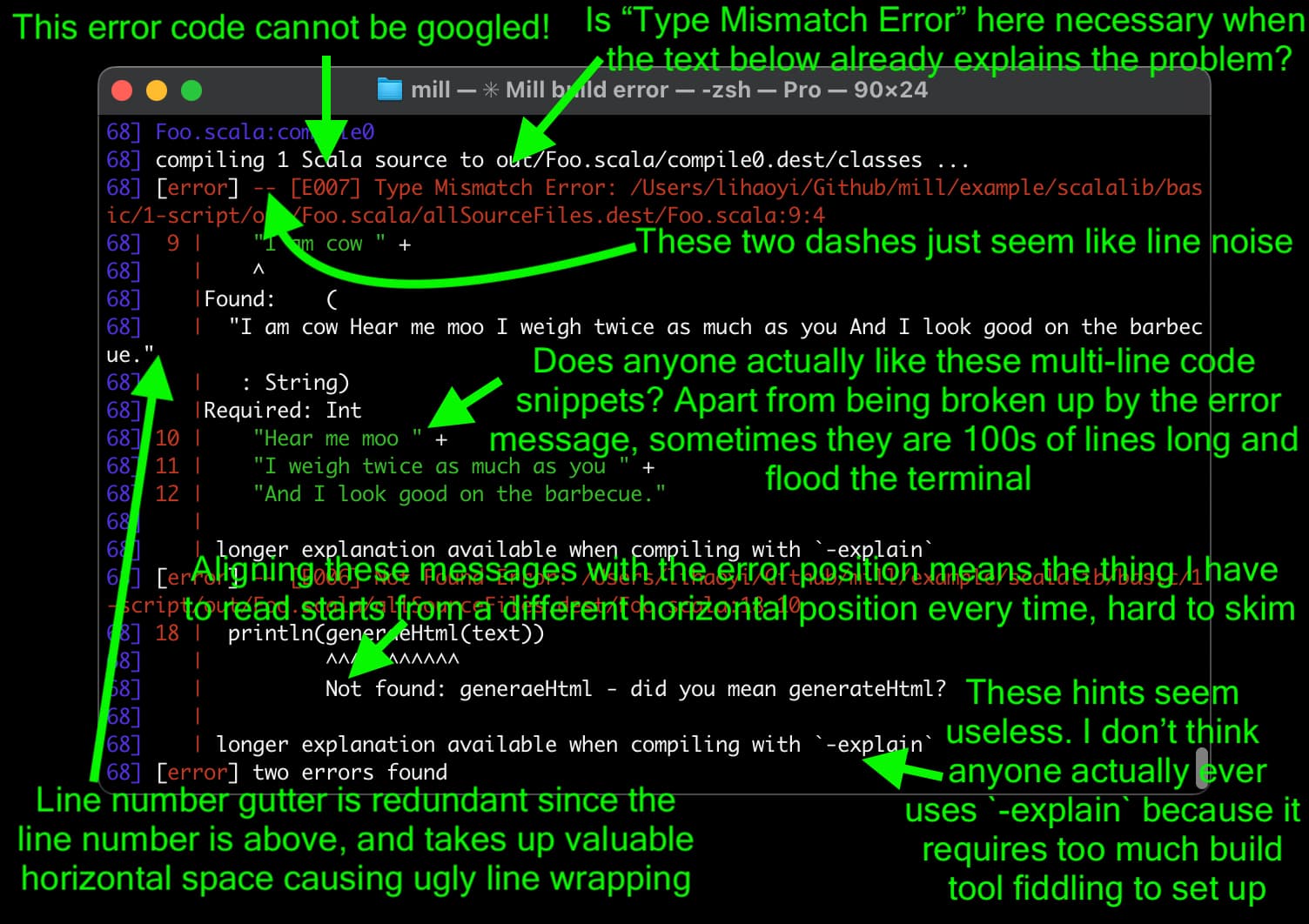
I find Scala 3’s error formatting to be exceedingly noisy and unhelpful. It might not be immediately obvious why, so I annotated a copy of this image below to try and show what I mean
I agree that the style can be improved in various ways and that we should invest time to do that.
But there is one thing I want to comment on:
“These hints seem useless I don’t think anyone actually ever uses -explain because it requires too much build tool fiddling to set up”
This is a problem for the build tools that we also need to fix! Every build tool should make it easy and natural to pass options to the compiler on the command line. Right now, at least sbt does not, (or it’s not easily discoverable how to do it), and that should be changed.
With all the authority of a random person on the internet, my 2c here is that optimizing for human readability may be less impactful than optimizing for LLM readability, or possibly even changing the compiler error messages to recognize it’s target (human vs machine) audience
I acknowledge that I do not know what LLM readability looks like.
Mostly I just want to offer the note that I more or less now pipe error messages straight to LLM on a Hail Mary before I consider reading them… I suspect that I am not unusual in this regard. This works great in LSP land…
But I’m not sure of the extent to which the LLMS get’s that level of help** straight out the compiler and / or whether they could. In extremis, LLMs are writing more of my code autonomously - I think I work in reasonably verifiable domains. Hence; I could see value in such an approach too.
** Key LSP fields to use:
Diagnostic.message
Diagnostic.code (often maps to documentation pages—great context for the LLM)
Diagnostic.data (implementation-specific; you can stash more context here)
TextDocument content around range (to provide the LLM with the code snippet)
We could potentially add a command alias for that like enableExplain.
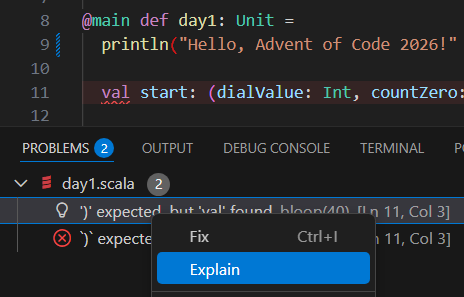
But anyway, I don’t think it’s really a build tool issue. It’s more a wholesale user experience issue. The ideal UX for explain messages is that my IDE displays a little clickable “> Explain this error message” thing in the error box. Always available, always one click away, always disappears again after I’m done with the error.
This would be the ideal scenario. With some tinkering we could try to achieve something similar via DiagnosticCodeDescription field in LSP diagnostics, it could potentially link to a a command that just shows the full explanation.
Though this would not be possible out of the box in LSP as far as I see
I think everyone has their own set of feelings about what makes for good error messages?
I like the line numbers and code context. If anything I’d like more context (but not 100s of lines–just cut it at some pre-set max, like 5 lines).
I like the gutter because it’s easier to parse visually for me (and allows fewer line breaks). Not knowing the width of a terminal window is a problem for wrapping elegantly, though–if we could guarantee that we knew, then we could wrap and persist the gutter.
I like the clear statement of the nature of the error at the top so I don’t have to go hunting for it. The error code doesn’t bother me.
I don’t like error messages being aligned with the indicator arrows.
I don’t like -explain over and over. Once, at the end of the whole error message, maybe, if it’s applicable, and not in shells at all. (Yes, I realize it’s a per-error property. No, I don’t care.) The build tool should be the one to generate the message so you get a build-tool-specific instruction.
I don’t like the super-long pathname before the error location (which you didn’t point out)–how can you find 9:4 after all that stuff?
I don’t like how arrows are handled on long lines. This is completely uninterpretable if the lines are longer than the terminal window width.
Adding gutters upon gutters upon gutters gets annoying if the build tool adds them. Tell me what it is at the top, then have one gutter. A guide line is fine.
If I have indented code, and it’s all indented, why do I need to see all the extra spaces in the error message for every line of code I see? Should be dedented first for display.
It’s all pretty okay, though. The richness of the message matters more.
One downside of not aligning messages is in cases like this:
Could you explain what is the problem with -explain please? We have this option enabled in all our builds… and I’m not sure I understand what is the reason to don’t have it.
Why we have to ask for explanation? Why -explain is not “on” by default?
Explicit opt-out option like -do-not-explain makes more sense to me. Compiler must be as helpful to new developers as it can, but Scala 3 expects that those, who do not understand what happened, will be able to find the arcane flag, which explains.
Because the existing error message is perfect. The existing messages:
Not found: generaeHtml - did you mean generateHtml?
Found: String, Required: Int
already tell me everything I need to know. The additional text that -explain provides is of negative value and would only add to the confusion for the vast majority of users:
  | Tree: ""
  | I tried to show that
  |   ("" : String)
  | conforms to
  |   Int
  | but none of the attempts shown below succeeded:
  |
  |   ==> ("" : String)  <:  Int
  |     ==> String  <:  Int  = false
  |
In this case the trees and types are trivial, but in more realistic cases it quickly becomes overhwlemingly verbose and unteadable
I agree that suggesting try again with -deprecation or -explain or -etc is absolutely infuriating.
Such “supplementary” messaging should always be included in the diagnostics, and it is up to the tool processing the diagnostics to make them available to the user, perhaps with a “show more” button or similar.
Along these lines, I had an idea to emit -Vprint as an info diagnostic so that scastie could display it as a clickable icon. The compiler test rig is another tool that can’t display -Vprint output. Scala 2 partest can.
I have a branch that refactors MessageRendering; I’m willing to PR that in service of a feature request, if there is consensus how to reduce the horrible, unhelpful noise.
This is a very simple case. But there are other cases where the failure of the subtyping is not obvious and the error backtrace really helps. That’s why it’s not always on.
Other -explains notes are (at least sometimes) helpful for beginners. This one is more oriented toward more advanced users and code bases,
We might need another flag for that, maybe -explain-advanced. But then we need to change the UI to accommodate more than one explains. Not sure it’s worth the complication.
@satorg Since you have -explain always on, can you comment on whether having the back traces show on all type mismatches is more annoying than helpful?
at $WORK I’ve set -explain on all Scala 3 projects I maintain or work with - sometimes it floods the output and I’ve learned to scroll back a lot, but scrolling the flood is still better than not having it -explain.
I see the first error - absence of implicit context at line 2 (useless, it can’t infer context because of the error at line 3), and then a real error at line 3. And the old rule – “look only on first error, others may be caused by incorrect compiler state after first error” stops working.
This issue is ‘too small’ to fill the bag report, but annoying.
I think fixing, improving the error messages is the single most significant thing we could do to help adoption of scala these days.
Tooling is more or less on par with other languages, we have great docs and training materials.
Unfortunately I don’t have a good answer to how error explanation should work, other than investigating how people use the errors to help them out to see what information is lacking.
Personally I often just feed it to the llm for explanation which works quite well in many cases. I wonder if the E error code actually could be pretty helpfull for the llm. All other noise is not, and keeping low on tokens is a good thing.
I have also seen the llm being able to trace back on implicit search etc with -explain saving me from a lot of reading.
Advanced users can always ignore hints, but it adds a lot of friction for new users to figure out how to add flags
Even in advanced cases, if I am a novice, I don’t understand the error message, and it tells me I can get more info, I will do it, because I won’t know this information will just be super complex and confuse me even more
Also IIRC, to have the output, you need to re-run the compiler, which takes extra time
I would rather have a scalac-explain command (or any other name) which re-prints all error messages from the last compilation with the “explain” added
That would have the other upside that it can be buildtool agnostic
(As for how to implement it, I would say either a special temporary file, or an environment variable)
It could even accept a parameter so we could do:
<first error message here>
longer explanation available by running `scalac-explain 1`, or re-running the compiler with `-explain`

<second error message here>
longer explanation available by running `scalac-explain 2`, or re-running the compiler with `-explain`
...
Running scalac-explain 2 would print:
<second error message here>
<explain output for the second error message here>
We could also take this opportunity to make it clearer to novices this probably not going to help them:
<error message here>
To get advanced debug information, run `scalac-explain 1` or re-run the compiler with `-explain`
100% agree with this, and I think something like scalac-explain could also help with it